This tutorial demonstrates how to downscale output from a PEcAn ensemble run. We used the magic-ensemble CLI to run SIPNET at a representative sample of fields from the CADWR Land Use dataset.
The downscaling step fits Random Forest models to the ensemble output at those sampled fields, then predicts carbon stocks and greenhouse gas fluxes for target fields with the required covariates. It aggregates the field-level predictions into county and run-scope summaries.
The demo covers four Sacramento-San Joaquin Delta counties: Yolo, Solano, Sacramento, and Contra Costa. The demo inputs contain output for 100 design points distributed across California; the workflow uses these outputs to predict outcomes for fields within those four counties. All 100 sites and 10 ensemble members have 96 monthly soil-carbon values in the verified demo. Runtime depends on input scope and allocated computing resources.
NoteScope
The demo dataset includes field data layers for these four Delta counties. Its state_summaries.csv output therefore summarizes the four-county demo extent; so the demo ‘statewide’ estimates only represent the four-county extent.
For each plant functional type (PFT), output variable, and scenario, the workflow fits one forest per ensemble member using the final available month’s values at the design points. It also fits forests for the first month to estimate change over the simulation period.
This documentation assumes that the steps in Environment setup have been completed. In a new terminal session, follow its startup instructions. Run all commands below from the downscaling repository root.
modelout/ – SIPNET output, 100 design points x 10 ensemble members, 2016-2023, under output_inventory/
data/ – field geometry, attributes, covariates and county boundaries for the four demo counties, plus covariates for the design points so the model can train
Inspect the inputs
Start with config.yaml: identify the model-output directory, data-layer directory, scenario, output variable, and run directory. In the model-output directory, site_info.csv identifies the design points and output_inventory/out/ holds the NetCDF files. In the data layers, site_covariates.csv supplies predictors; cadwr_crops_sites.gpkg and cadwr_crops_site_summary.csv identify target fields.
For example, the supplied output_inventory/out/ENS-00002-328163/2016.nc contains one location and 2,928 time steps. This excerpt from its NetCDF header shows the soil-carbon variable and its units:
dimensions:
    lon = 1 ;
    lat = 1 ;
    time = UNLIMITED ; // (2928 currently)
variables:
    double time(time) ;
        time:units = "days since 2016-01-01 00:00:00" ;
    double TotSoilCarb(time, lat, lon) ;
        TotSoilCarb:units = "kg C m-2" ;
        TotSoilCarb:_FillValue = -999. ;
        TotSoilCarb:long_name = "Total Soil Carbon" ;
The preview below reads the covariate table staged by prepare. site_id joins these rows to the model output and field attributes. The numeric columns passed to the fitting routine are shown beneath it; constant columns may be dropped when fitting a PFT.
site_covariates.csv describes the fields where SIPNET was run and the fields where predictions are needed. The workflow joins these data using site_id.
Feature group
Columns
What they describe
Climate
temp, precip, srad, vapr
Multi-year temperature, precipitation, solar radiation and atmospheric moisture summaries
Soil and terrain
clay, ocd, twi
Clay content, soil organic carbon density and topographic wetness
Crop history
eof_*
Principal components summarizing crop sequences across years; preparation retains up to 10 components
Mean green-up and senescence day of year, and their variation across years
Tillage
tillage_rank, tillage_freq
Monitored tillage rank and fraction of monitored years with detected tillage
Irrigation
irr_canopy, irr_flood
Indicators derived from the monitored irrigation categories
Field
area_ha
Field area, also used to convert predicted density to a field total
PFT
pft_annual_crop, pft_woody_perennial_crop
Indicators of the assigned PFT
The clustering scripts use the seven climate, soil and terrain features plus the crop-history, phenology and management columns present in the input table. With 10 crop-history components and all eight phenology and management columns, this is 25 clustering features.
Site selection groups fields separately within annual and woody perennial PFTs, using standardized features and k-means clustering. It selects fields near the cluster centers, then uses farthest point sampling to choose a smaller set that represents the feature space.
The Random Forest predictor list is selected separately: downscale uses all numeric columns of site_covariates.csv except climregion_id. These are used to fit the Random Forest; site_id is key that joins the model output with the covariates.
Explore CLI layout
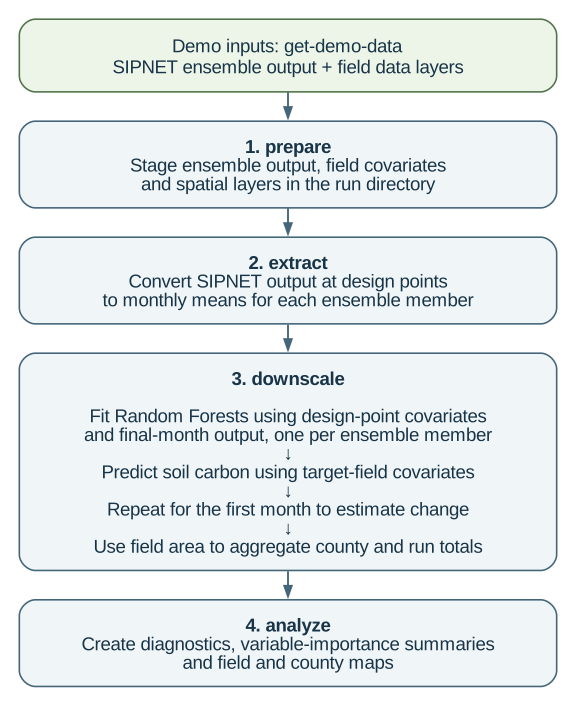
Execution is controlled by magic-downscaling and proceeds in four stages: staging inputs, extracting model output, downscaling, and analysis.
./magic-downscaling-h
The commands correspond to the workflow steps described below.
Key points:
extract, downscale, and analyze are lists of steps, each calling one script.
All tuning happens through command-line arguments the CLI builds. Scripts never read environment variables for config.
A step declares inputs (files), outputs (files) and params (everything else) as {cli_flag: value_key} pairs. The key is the literal flag the script expects.
inputs and outputs values must be keys in the manifest’s paths block, all relative to run_dir. That indirection is what lets you move a run without editing a script.
params resolve from your config first, then mode_params, then fixed_values.
--verbose reports the exact call issued for each step.
Keep mode: production to use all sites, ensemble members, and years in this small four-county dataset. By comparison, demo reads all sites for one member and the final year, while dev reads the first 10 sites and members for the final two years. The inventory scenario matches the downloaded output_inventory/ directory. outputs_to_extract limits this walkthrough to TotSoilCarb. run_dir controls where results are written; the two input-directory keys identify the downloaded model outputs and data layers. Set n_cores to your allocated CPUs.
copies ensemble output and data layers into run_dir, so the run is self-contained and can be archived or moved
fails immediately if a scenario in your config has no matching output_<scenario>/ directory, which is the usual sign the config and the ensemble disagree
The PEcAn workflow writes one NetCDF per site, per member, per year at sub-daily resolution. The extract step reads these, averages to monthly, and writes one long table in the EFI (Ecological Forecasting Initiative) standard format. Each value is a monthly mean for one site, ensemble member, scenario and variable. The subsequent RF fits select individual months from this table; they do not pool the monthly time series into one training set.
ensemble_output.csv as written by extract
rows
sites
members
months
variables
96,000
100
10
96
TotSoilCarb
For a complete table with one scenario and every combination present, the row count is sites x members x months x variables. Check missing combinations and duplicate keys before interpreting a difference from that count.
Values here are still in SIPNET units, kg C m-2 for pools. Conversion to Mg C ha-1 happens in the next step.
takes the design points that ran with that PFT as training data
selects the final available month and fits one Random Forest per ensemble member, to that month’s mean model output
predicts every field of that PFT, converts to reporting units, multiplies by area
repeats for the first month so a change between the two monthly means can be formed
aggregates to county and state
Fitting one forest per member is what carries the ensemble’s parameter uncertainty through to the field level instead of collapsing it to a single number.
For each ensemble member, soil carbon density is converted to a field total:
total_per_field (Mg C) = density_per_ha (Mg C/ha) × area_ha (ha).
Field totals are summed within each county and PFT. County density is the county total divided by represented field area. The mean and standard deviation are then computed across ensemble members.
Output column
Meaning for soil carbon
density_per_ha
Field soil carbon density, Mg C/ha
total_per_field
Field soil carbon stock, Mg C
mean_total_per_county
Mean county stock across members, Mg C; the table below displays Gg C
mean_density_per_ha
Mean across members of area-weighted county density, Mg C/ha
analyze writes diagnostics and maps to figures/, including county and field maps, variable-importance summaries, and response curves for important predictors.
Field results
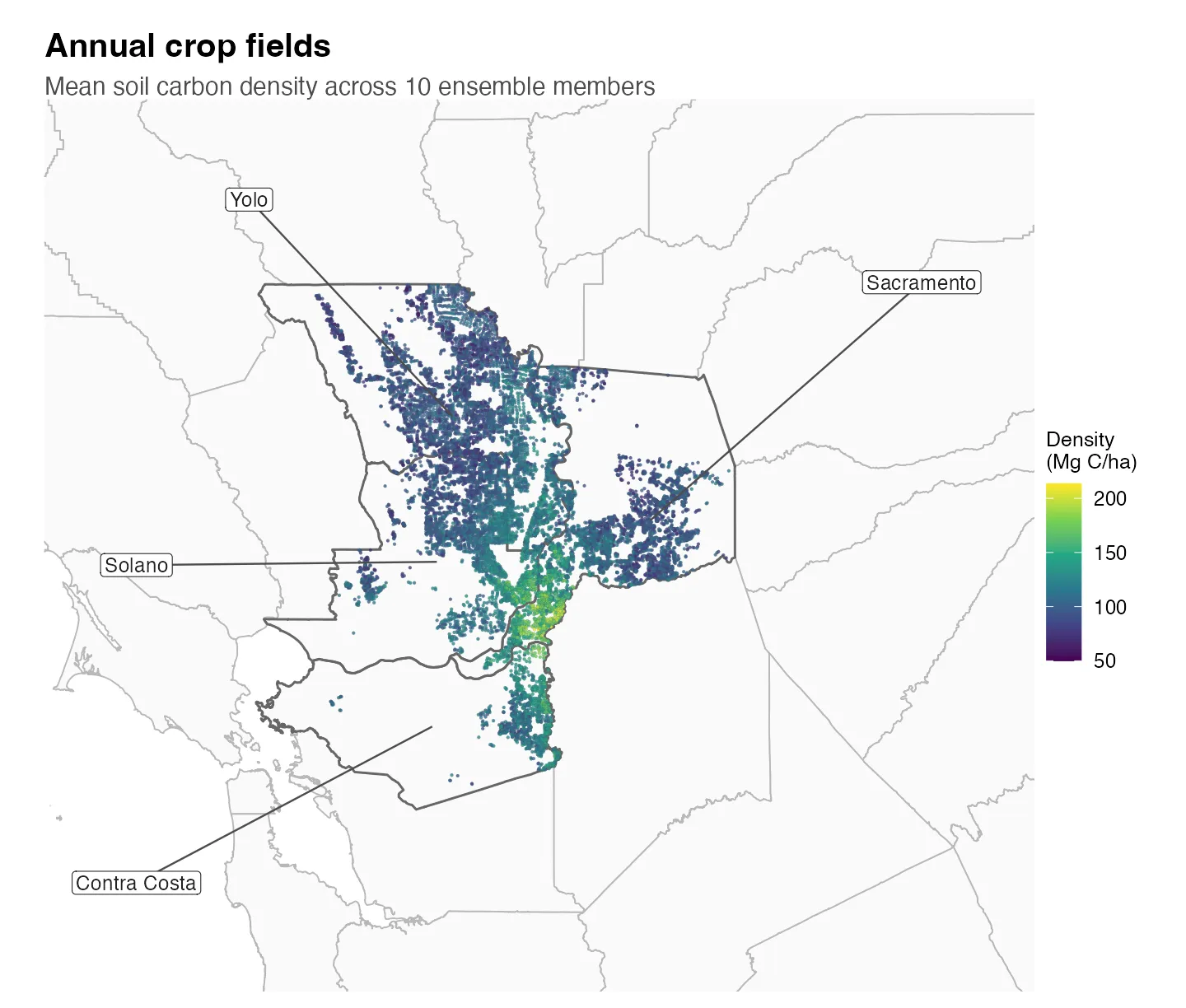
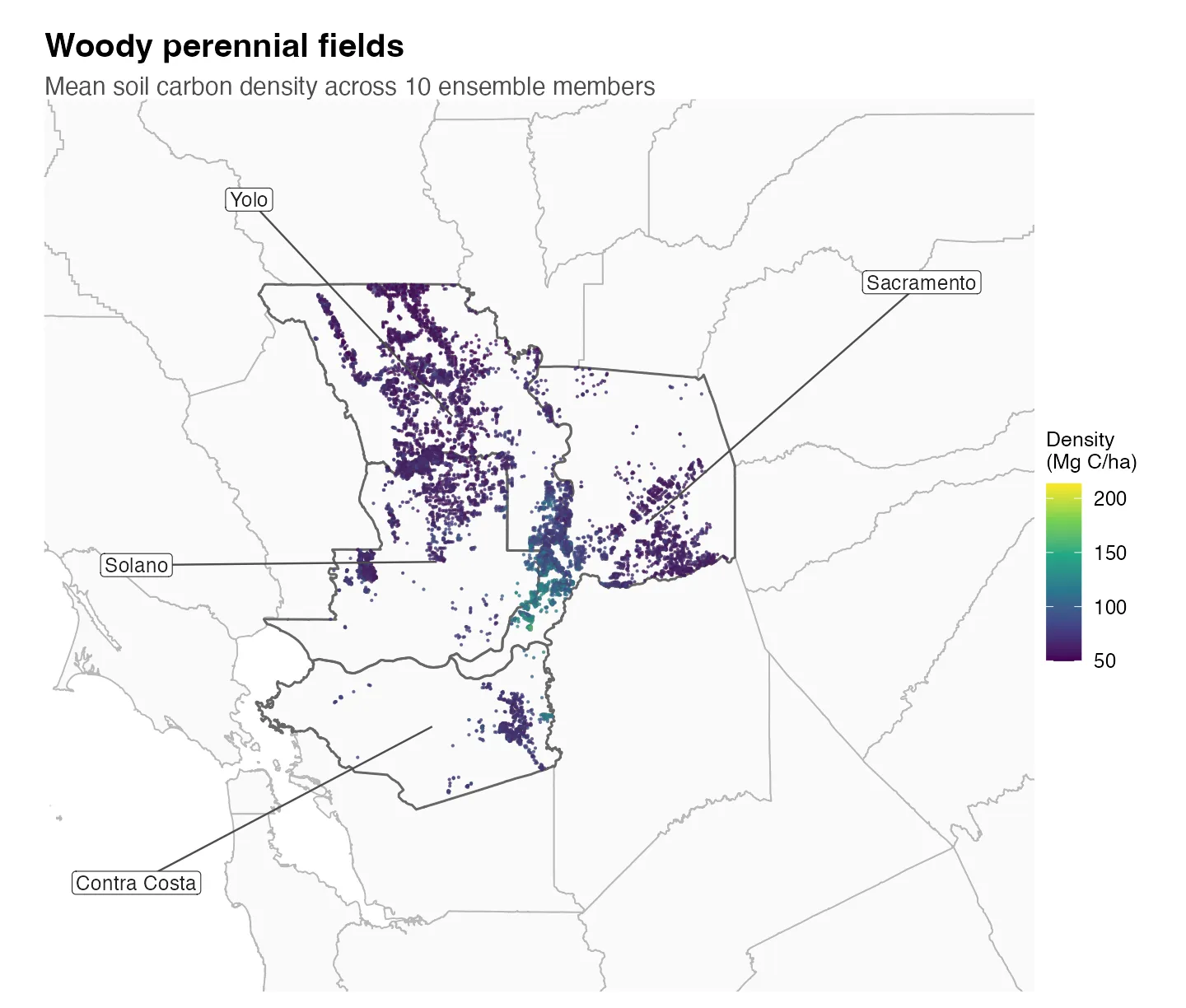
The maps show each predicted field’s mean soil carbon density across the 10 ensemble members.
Ensemble-mean soil carbon density for annual-crop fields, in Mg C/ha. County names use leader lines; fields without covariates are not shown.
Ensemble-mean soil carbon density for woody-perennial fields, in Mg C/ha. County names use leader lines; both maps use the same color scale.
County results
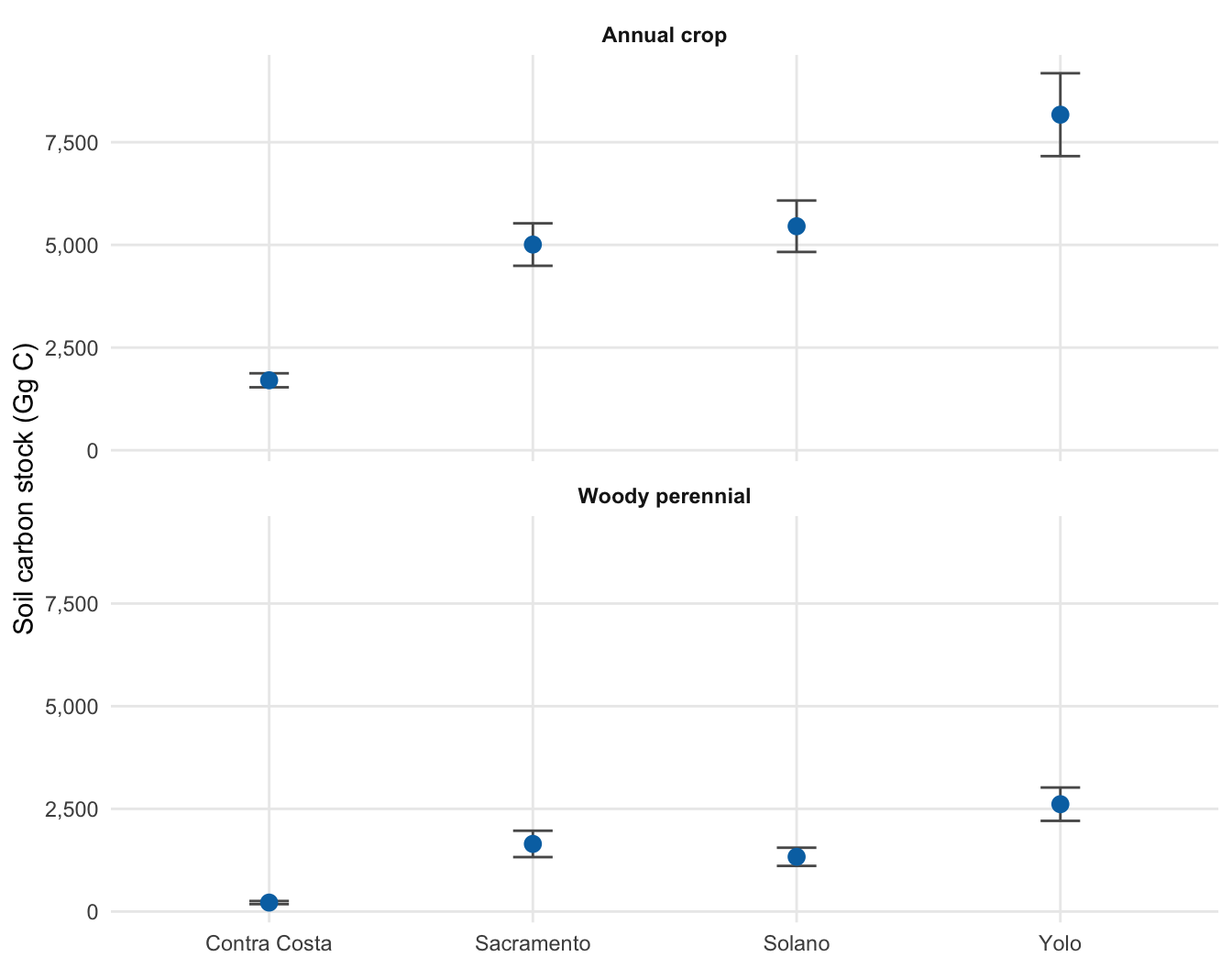
County stock is the sum of predicted field stocks within each ensemble member and is then summarized across the 10 members.
Points are mean county soil carbon stock in Gg C; bars show ±1 SD across 10 ensemble members. Both panels use the same scale.
Total soil carbon stock represented by predicted fields; modeled values use two significant figures.
County
Crop type
Fields
Stock mean (Gg C)
Stock SD (Gg C)
Contra Costa
Annual crop
1,183
1,700
170
Sacramento
Annual crop
4,554
5,000
520
Solano
Annual crop
3,547
5,500
630
Yolo
Annual crop
5,272
8,200
1,000
Contra Costa
Woody perennial
646
220
38
Sacramento
Woody perennial
2,261
1,600
320
Solano
Woody perennial
1,838
1,300
220
Yolo
Woody perennial
3,428
2,600
410
SD describes spread across ensemble members; it is not a confidence interval.
Model checks
Use these checks to confirm field coverage and how well the Random Forests reproduce the SIPNET results at the design points.
Coverage. This run predicted 22,729 fields. Each field has values from all 10 ensemble members. Compare the range of predicted values with the SIPNET values used for training; values far outside that range need review.
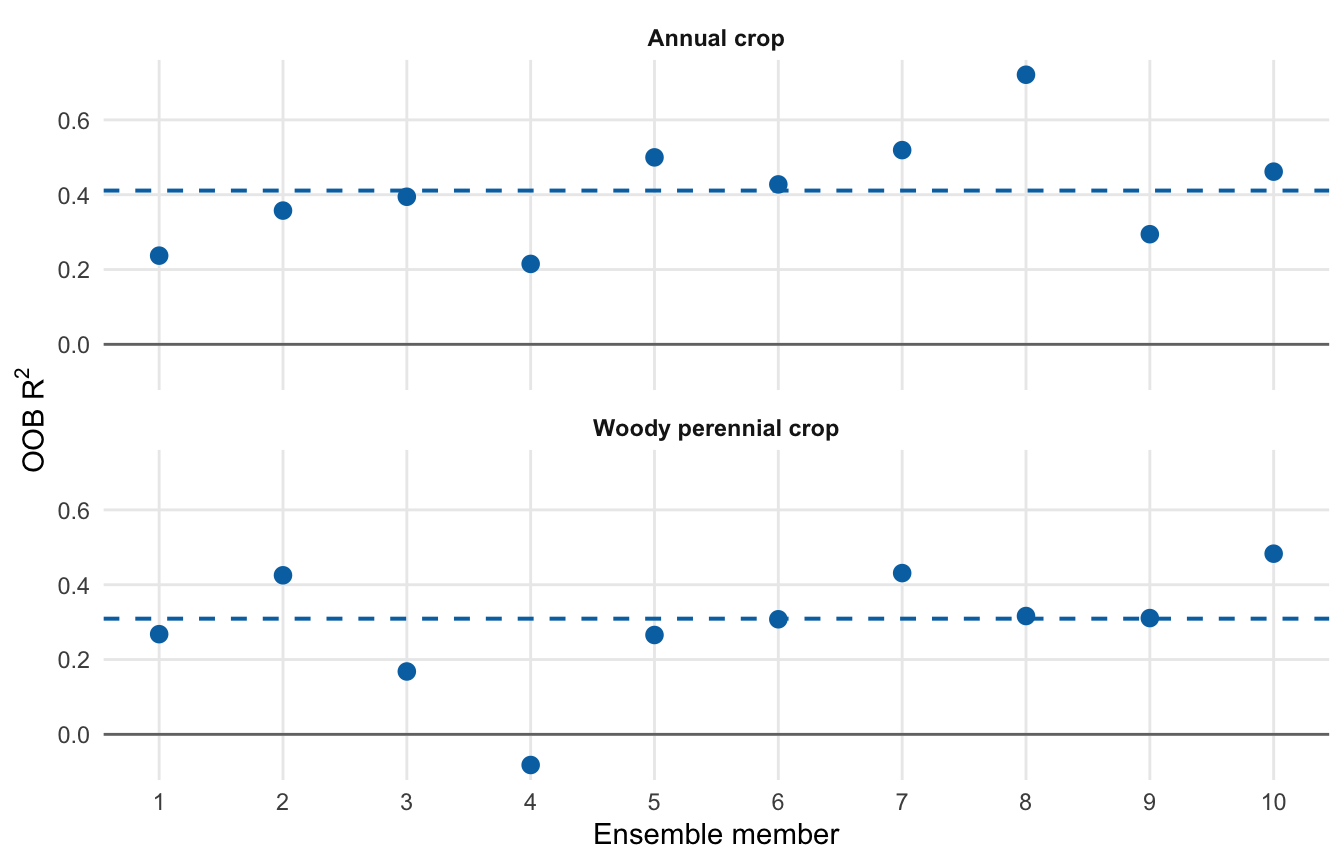
Model fit. Out-of-bag (OOB) R2 measures how well each forest predicts SIPNET values left out during fitting. Higher values are better. Zero is no better than using the average training value, and negative values are worse. This checks the Random Forest, not SIPNET or the inventory against field measurements.
Random Forest fit across the 10 ensemble members.
Crop type
Members
Median OOB R2
Members below zero
Annual crop
10
0.41
0
Woody perennial
10
0.31
1
Each point is one ensemble member. The dashed blue line is the PFT median; the solid gray line marks zero.
Median OOB R2 is 0.41 for annual crops and 0.31 for woody perennial crops. One woody-perennial member falls below zero. These scores show how well the Random Forests copy SIPNET at the design points; they do not show whether modeled soil carbon agrees with measurements.
Scaling beyond the demo
The same four commands can be used with a larger inventory. In the configuration, set mode: production, point pecan_output_dir and data_layers_dir to the full input directories using paths relative to the repository, and list the outputs to process. Set n_cores to the CPUs in the compute allocation.
The four county demo used 10 ensemble members for 2016-2023. With 1 CPU and 28 GB of allocated memory, download and all four stages finished in under 15 minutes; Slurm recorded about 1.15 GiB peak memory.
Treat these measurements as a starting point. Runtime and storage increase with the numbers of fields, ensemble members, variables, and scenarios. The prepare step also copies the input data into run_dir, so the run needs space for both the source data and the staged copy.